728x90
반응형

prometheus 13

Prometheus Remote Write 구성 정리 (Sender / Receiver)

federate나 target을 직접 추가해 주는 방법도 있는데Sender, Receiver 방법도 사용 가능하다. 1. Remote Write를 보내는 Prometheus (Sender)##Prometheus CR 리소스를 수정#remoteWrite 설정spec: remoteWrite: - url: "https://{prometheus_receiver_url}/api/v1/write" tlsConfig: insecureSkipVerify: true # (테스트용) 인증서 검증 스킵#Cluster 구분을 위한 External LabelsexternalLabels: cluster: dev-cluster-01 origin_prometheus: dev-cluster-01 ..

prometheus rate irate 차이점 비교

grafana에서 metrics을 가져올 때 rate 함수를 써야 할지 irate 함수를 써야 할지 고민이라면 아래 그래프와 설명을 보고 해당 환경에 맞게 선택하면 된다. 맨 밑에 적어놓은 설명은 한 번씩 읽어보시면 될 것 같고 간단하게 얘기하자면 아래 그래프에서 보듯이 변동성이 심한 부분은 irate 함수를 사용한 그래프고 변동성이 적은 부분은 rate 함수를 사용한 모습이다. 자세한 내용은 아래 글을 참고하시길 바란다. rate() rate(v range-vector)범위 벡터에서 시계열의 초당 평균 증가율을 계산합니다. 단조로움의 중단(예: 대상 재시작으로 인한 카운터 재설정)은 자동으로 조정됩니다. 또한 계산은 시간 범위의 끝까지 외삽하므로 누락된 스크랩 또는 스크랩 주기가 범위의 기간과 불완전하..

통합 Prometheus federate 옵션 사용 시 metrics 보관 주기

통합 Prometheus federate 옵션을 사용해서 모니터링 시스템을 구축했을 때 metrics 보관 주기를 효율적으로 설정하는 방법이 있다. 통합 Prometheus federate 옵션으로 여러 개의 Prometheus를 한 곳의 Datasource로 모아서 구현하는 방법이 궁금하다면 글을 읽고 오시기 바란다. https://babbeolicoding.tistory.com/59 통합 Prometheus federate 옵션 Prometheus가 많아질수록 Datasource도 점점 많아진다. Datasource가 많아지면 Grafana에서 metrics 조회 쿼리를 작성할 경우 조건에 따라 매번 다른 Datasource를 선택해줘야 하기 때문에 굉장히 번거롭다. 이런 babbeolicoding...

한 서버에 prometheus n개 설치하기

한 서버 내에 prometheus를 여러 개 설치하는 건 가능하다. 다만 prometheus의 운영 port는 기본적으로 9090인데 해당 port만 수정해 준다면 한 서버에 n개의 prometheus를 설치할 수 있다. prometheus가 이미 설치되어 있는 경우 이미 사용하던 내용을 그대로 복사해서 n번째 prometheus를 만들어 낼 수 있는데 간편하게 만들기 위해 스크립트를 짰다. 아래 스크립트를 이용해서 prometheus2로 서비스를 바로 만들 수 있다. (물론 폴더 이름이나 port이름은 원하는대로 바꿀 수 있다) sudo mkdir -p /etc/prometheus2 sudo mkdir -p /var/lib/prometheus2 sudo cp /usr/local/bin/prometheu..

통합 Prometheus federate 옵션

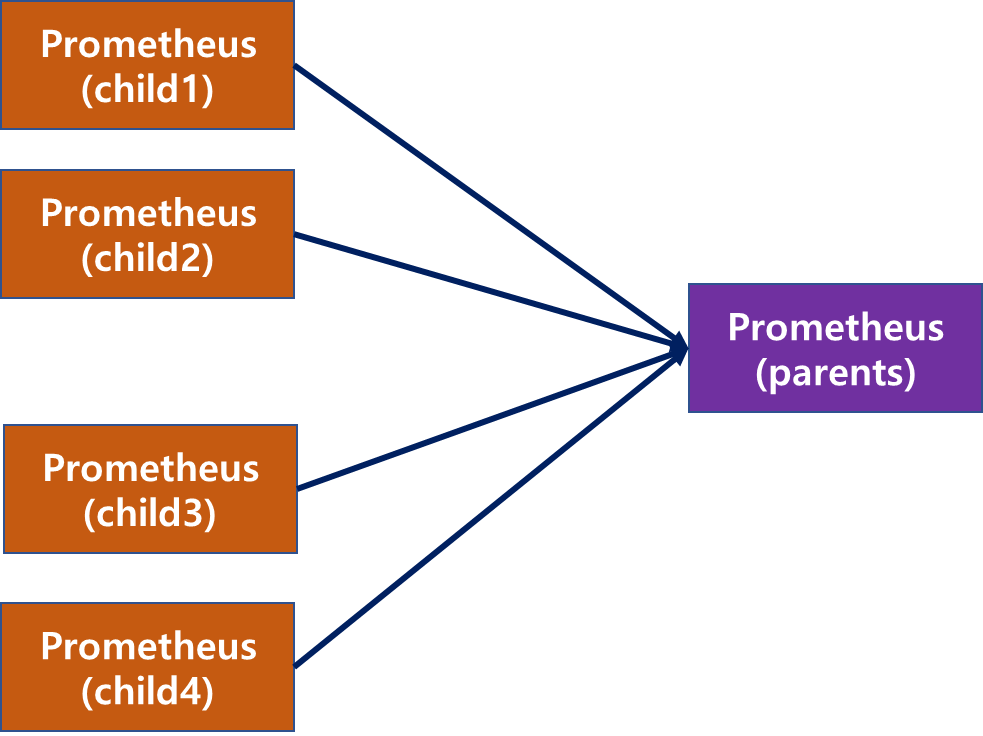
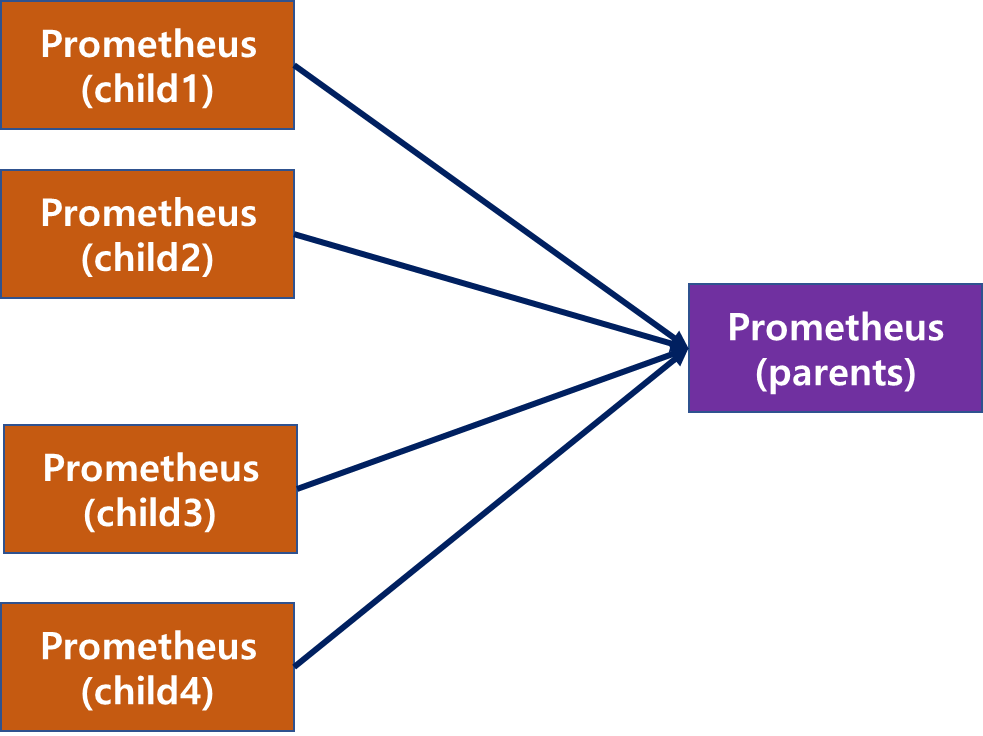
Prometheus가 많아질수록 Datasource도 점점 많아진다. Datasource가 많아지면 Grafana에서 metrics 조회 쿼리를 작성할 경우 조건에 따라 매번 다른 Datasource를 선택해줘야 하기 때문에 굉장히 번거롭다. 이런 불편함을 해소하기 위한 방법으론 여러 child prometheus의 datasource를 parents prometheus datasource가 스크랩을 하면 parents datasource에서 모든 child의 datasource를 사용할 수 있다. (명칭이 맞는지 모르겠으나 간편하게 표시하기 위해 chid, parent라는 표현을 쓰도록 하겠다) 그림을 통해 보면 child, parents 구성은 아래와 같다. 물론 같은 서버에서 prometheus를 ..

Grafana Alert 설정하기-4(No Data Alert 설정)

Grafana에서 Alert을 설정할때 아래 이미지처럼 "No data"로 metrics이 수집이 안되는 경우 보통 Alert이 날아간다. 하지만 경우에 따라 No data인 경우가 정상이고 metrics이 수집되는 경우 비정상인 경우도 필요하다. 이런 경우는 Alert을 설정할때 Configure no data and error handing 부분을 설정해주면 No data인 경우도 Alert을 보내지 않을 수 있다. Alert을 설정할때 Configure no data and error handing 부분을 클릭하면 Alert state if no data or all values are null 부분이 보통 No Data로 되어있다. 이 설정은 metrics이 아무것도 수집되지 않는 경우 즉 No ..

Grafana , Prometheus 연동

1. Grafana 접속 - 최초 계정 : admin/admin 2. 설정 -> Data sources 선택 3. Add data source 선택 4. Prometheus 선택 5. URL 입력 : http://prometheusip:9090 - prometheus 기본 port는 9090이고 변경도 가능하다. 6. Save & Test 선택 7. 연결 확인 - 연결이 정상적이면 아래 사진처럼 초록색 이미지와 함께 Datasource updated라고 뜸. - 비정상적이면 빨간색 이미지와 함께 연결실패라는 문구가 뜸.

Prometheus 이슈 및 troubleshooting

1. pod로 기동한 prometheus-node-exporter가 제대로 올라오지 않을 때 woeker node에 수동으로 node_exporter가 깔려 있고 pod로 node_exporter를 실행하려고 하면 에러가 발생하기도 함 2. err="open /data/queries.active: permission denied" - 아래 설정 수정 후 prometheus-server 재기동 필요 err="open /data/queries.active: permission denied" 오류 발생 prometheus-server deploy 수정필요 kubectl edit deploy prometheus-server -n prometheus #helm으로 prometheus를 설치하면 아래 처럼 기본 세..

Prometheus metric 보관 주기 변경

1. system service로 운영 중인 prometheus - 보관 주기를 설정하지 않으면 기본 보관 주기 15d로 설정된다. - metric 보관 기간을 늘리고 싶다면 --storage.tsdb.retention.time=1y를 추가해 주면 된다. vi /etc/systemd/system/prometheus.service # 또는 vi /usr/lib/systemd/system/prometheus.service # 등등 [Unit] Description=Prometheus Wants=network-online.target After=network-online.target [Service] User=prometheus Group=prometheus Type=simple ExecStart=/usr/l..

Prometheus Helm 설치

Helm으로 간단하게 Prometheus 설치가 가능하다. 1. Helm 설치 #Helm 설치 sudo snap install helm --classic helm version #저장소 등록 helm repo add prometheus-community https://prometheus-community.github.io/helm-charts #저장소 복사 git clone https://github.com/prometheus-community/helm-charts 2. Prometheus 설치 #해당 파일 경로로 이동 cd helm-charts/charts/prometheus #namespace 생성 kubectl create namespace prometheus #helm으로 prometheus 설치..

728x90
반응형