통합 Prometheus federate 옵션을 사용해서
모니터링 시스템을 구축했을 때
metrics 보관 주기를 효율적으로 설정하는 방법이 있다.
통합 Prometheus federate 옵션으로
여러 개의 Prometheus를 한 곳의 Datasource로 모아서 구현하는 방법이 궁금하다면
글을 읽고 오시기 바란다.
https://babbeolicoding.tistory.com/59
통합 Prometheus federate 옵션
Prometheus가 많아질수록 Datasource도 점점 많아진다. Datasource가 많아지면 Grafana에서 metrics 조회 쿼리를 작성할 경우 조건에 따라 매번 다른 Datasource를 선택해줘야 하기 때문에 굉장히 번거롭다. 이런
babbeolicoding.tistory.com
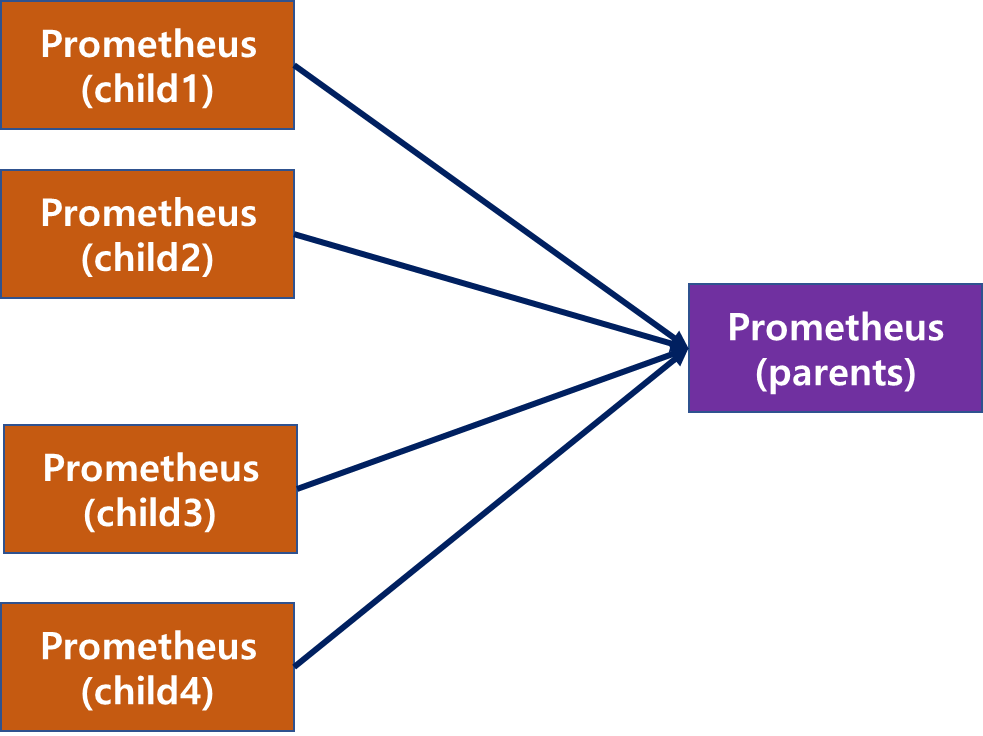
만약 아래 그림처럼 child1,2,3,4 Prometheus가 있고 parents Prometheus가 있고
metrics 수집 기간을 180d만 남기고 싶다면
모든 Prometheus의 metrics 보관 주기를 180d로 할 필요는 없다.
4개의 child Prometheus의 metrics 보관 주기는 1d로 설정하고
parents Prometheus만 180d로 설정하면 된다.
쓸데없이 용량을 낭비하지 말자.
참고로 Prometheus metrics 보관 주기 변경하는 방법은
아래 링크를 확인하시길 바란다.
https://babbeolicoding.tistory.com/22
Prometheus metric 보관 주기 변경
1. system service로 운영 중인 prometheus - 보관 주기를 설정하지 않으면 기본 보관 주기 15d로 설정된다. - metric 보관 기간을 늘리고 싶다면 --storage.tsdb.retention.time=1y를 추가해 주면 된다. vi /etc/systemd/sys
babbeolicoding.tistory.com
'모니터링(Grafana, Prometheus) > Prometheus' 카테고리의 다른 글
| Prometheus Remote Write 구성 정리 (Sender / Receiver) (0) | 2025.12.30 |
|---|---|
| prometheus rate irate 차이점 비교 (0) | 2023.07.17 |
| 한 서버에 prometheus n개 설치하기 (0) | 2023.07.05 |
| 통합 Prometheus federate 옵션 (0) | 2023.07.04 |
| Prometheus 이슈 및 troubleshooting (0) | 2023.05.04 |