728x90
반응형

POD 9

calico 다중 네트워크 인터페이스 환경

calico가 비정상적으로 네트워크 인터페이스를 연결하는 경우 master node에서 worker node에 있는 pod로 연결이 안됨 pod간 통신이 원활하지 않는 경우가 있다.status: conditions: - lastTransitionTime: "2025-08-28T02:59:56Z" message: 'failing or missing response from https://10.42.16.66:10250/apis/metrics.k8s.io/v1beta1: Get "https://10.42.16.66:10250/apis/metrics.k8s.io/v1beta1": net/http: request canceled while waiting for connection (Client.Timeout e..

DNSConfigForming

kubernetes 설치 시 workernode에 DNS 서버를 4개 구성하면 etcd pod에서DNSConfigForming이라는 warn이 발생한다.Warning DNSConfigForming 11s (x3 over 53s) kubelet Nameserver limits were exceeded, some nameservers have been omitted, the applied nameserver line is: 172.30.32.1 172.30.32.2 172.30.32.3   원인kubernetes etcd는 cat /etc/resolv.conf 여기에 있는 namserver를 참고하는데 3개까지만 사용이 가능하다.무시해도 되지만 4번째 nameserver가 중요한 역할은 한다면4번째까..

kubernetes pod 재시작하는 방법

kubernetes에서 pod를 재시작하는 여러 가지 방법이 있고 상황에 맞게 명령어를 사용하면 된다. 1. scale 명령어 사용 선택한 deployment pod 개수를 0으로 설정 kubectl scale deployment [deployment-name] --replicas=0 선택한 deployment pod 개수를 1로 설정 kubectl scale deployment [deployment-name] --replicas=1 2. rollout restart 선택한 deployment pod들만 전체 재시작 kubectl rollout restart deployment [deployment-name] 3. delete 원하는 pod만 재시작 kubectl delete pod [pod-name]

Kubernetes/pod 2023.08.25

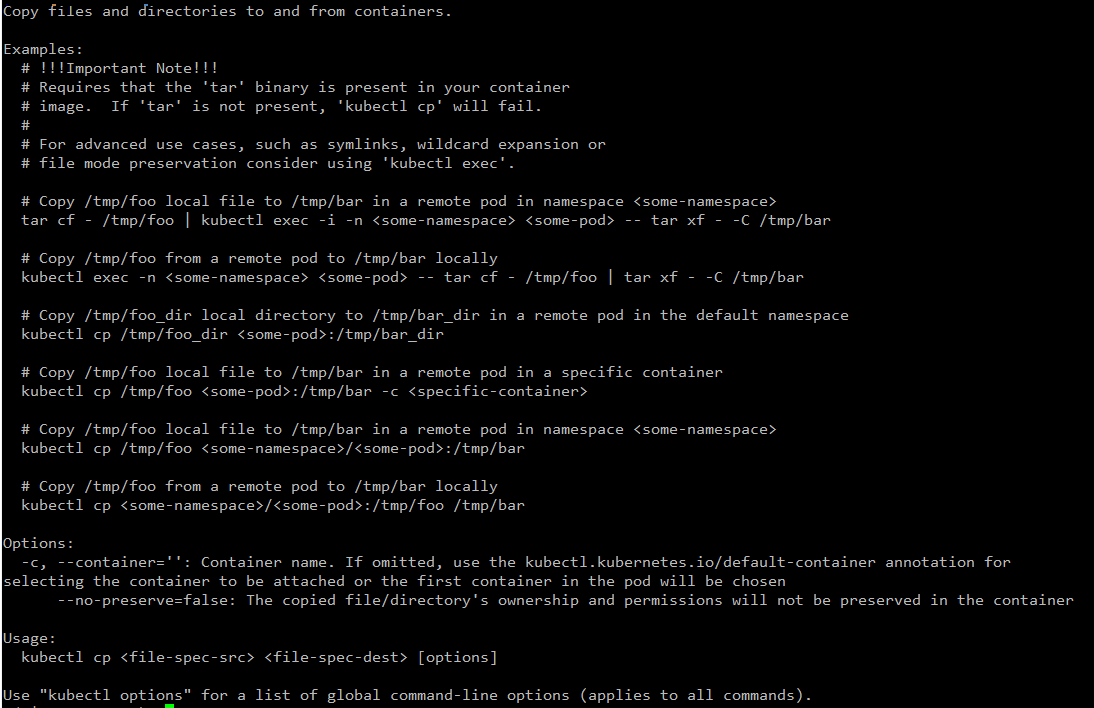
pod <-> local 파일 업/다운로드

1. local -> pod 파일 업로드 kubectl cp {file_name} {pod_name}:{path} ex) kubectl cp fileupload.txt test-deployment-112121-sdfwe:/app/fileupload.txt 2. pod -> local 파일 다운로드 kubectl cp {pod_name}:{file-path} {local-path} ex) kubectl cp test-deployment-121212-dsfdfd:/app/fileupload.txt /home/user/fileupload.txt "tar: Removing leading `/' from member names" 문구가 뜨지만 해당 메시지는 에러가 아니고 알림 메시지다. 압축할 파일의 경로에서 t..

Kubernetes/pod 2023.07.27

Docker Container 접속하기

Docker Container로 접속하기 전 해당 pod가 어느 노드에서 기동 중인지 확인을 해야 한다. 아래 명령어로 원하는 pod가 어느 노드에 있는지 확인을 한 뒤 해당 노드로 접속을 한다. kubectl get pod {pod_name} -o wide 노드 접속 뒤 docker 명령어를 통해 원하는 container를 찾는다. sudo docker ps -a | grep {docker_container_name} 위 명령어로 검색 뒤 나온 containerID를 통해서 접속을 하면 된다. docker exec -it {containerID} /bin/bash pod에는 접속할 수 없지만 node만 접속 가능한 사람들이라면 해당 기능을 통해 container에 file이나 구성을 확인하면 좋을 것 ..

Docker 2023.07.24

Command probe 적용하기

이전 포스팅에서 Probe를 체크하는 방법이 3가지가 있었는데 그중 Command로 Probe를 체크하는 방법에 대해서 포스팅을 진행해 봤다. Command probe 성공 : Command 실행 후 결괏값이 0이면 정상 실패 : Command 실행 후 결과값이 0이 아니면 실패 readinessProbe or livenessProbe 적용 readinessProbe: exec: command: - /test/probe/probe.sh test shell 파일 생성 후 테스트 - 권한이 없는 경우 chmod 777을 통해 권한 추가 필요 #!/bin/bash exit 0 소켓 or 스레드 개수를 확인 후 true / false 체크 #!/bin/bash #소켓 결과 RESULT=$(ls /proc/1/f..

Kubernetes 2023.05.31

Pod Lifecycle(readiness,liveness Probe)

kubelet이 각 컨테이너의 상태를 특정 조건으로 주기적으로 체크한 뒤 문제가 있는 pod를 자동으로 재시작하거나 문제가 있는 pod를 서비스에서 제외해서 네트워크 유입을 막을 수 있다. 해당 기능을 probe 구성이라고 한다. probe를 사용하는 방법은 간단하게 2가지가 있다. 1. readinessProbe - 프로브 수행 후 실패하는 경우 pod가 재시작되지 않고 해당 pod를 서비스에서 제외시켜 네트워크 유입을 막는다. 2. livenessProbe - 프로브 수행 후 실패하는 경우 pod가 재기동된다. Probe를 체크하는 방법 1. HTTP probe 성공: get 요청을 보내서 return이 200~300 사이면 정상 실패: 그 외의 값이 return 되는 경우는 비정상 readiness..

Kubernetes 2023.05.30

podAntiAffinity 정책

파드간 affinity 사용(podAntiAffinity) - affinity는 Pod를 특정 Node에 배포되도록 하는 정책이다 1. Hard affinity - 규칙이 만족되는 경우만 파드가 기동된다. #requiredDuringSchedulingIgnoredDuringExecution: 규칙이 만족되지 않으면 스케줄러가 파드를 스케줄링할 수 없다. 이 기능은 nodeSelector와 유사하지만, 좀 더 표현적인 문법을 제공한다. ex) 만약 node가 4개 인데 pod replicas가 5개면 pod 4개는 running이지만 pod 1개는 affinity 정책에 걸려 pending 상태로 남아있다. affinity: podAntiAffinity: requiredDuringSchedulingIgno..

Kubernetes 2023.05.24

Pod Resource 관리(cpu, mem limits)

resources 요청 및 제한 적용 - requests: 처음 pod를 실행할 때 필요한 최소 자원 - limits : cpu, mem 등의 제한 사용량 아래 코드를 보면 pod가 실행될때의 최소 사용량은 request이고 최대 사용량은 limits다. resources: requests: memory: "10Mi" cpu: "10m" limits: memory: "50Mi" cpu: "50m" 그럼 limits을 설정하고 그 이상 자원을 사용하면 어떻게 되는지 확인해 보자. 1. CPU limit을 사용하는 경우 - limits 조건 : request : 10m // limit : 50m resources: requests: cpu: "10m" limits: cpu: "50m" 아무리 부하를 줘도 C..

Kubernetes 2023.05.22
728x90
반응형
