반응형
1. 전체 아키텍처 구성도
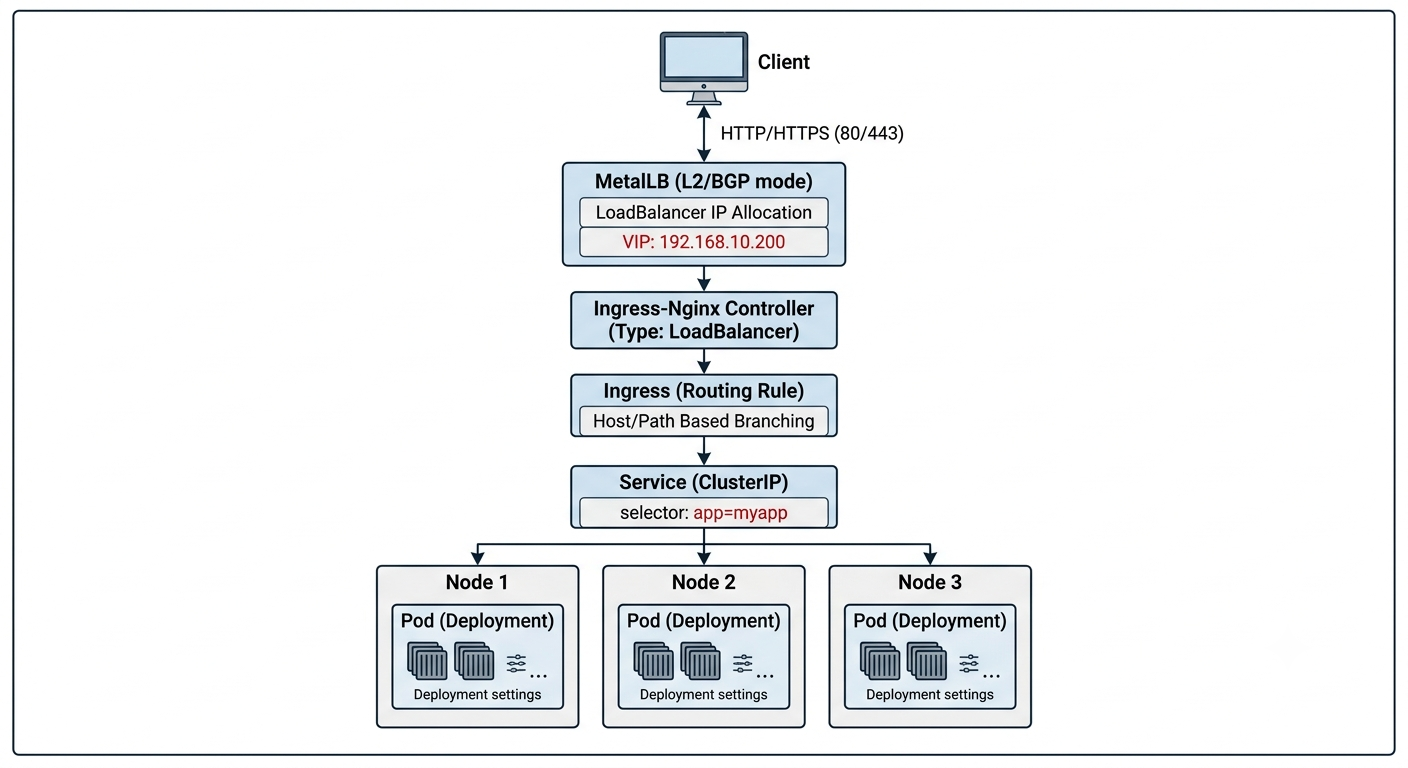
2. 구축 단계별 가이드
1단계: MetalLB (L4 로드밸런서) 설치
쿠버네티스 순정 상태에서 LoadBalancer 타입의 서비스를 사용하기 위해 L4 로드밸런싱을 제공하는 MetalLB를 설치
# 1. MetalLB 네임스페이스 및 컴포넌트 일괄 설치 (v0.13+ 기준)
kubectl apply -f https://raw.githubusercontent.com/metallb/metallb/v0.13.12/config/manifests/metallb-native.yaml

# 2. 설치 완료 확인 (Controller 및 Speaker Pod가 Running 상태인지 확인)
kubectl get pods -n metallb-system
2단계: MetalLB IP Pool 및 L2 광고 설정
MetalLB가 LoadBalancer 서비스 요청 시 할당해 줄 VIP 대역(IPAddressPool)과 이를 로컬 네트워크에 알릴 ARP 광고 방식(L2Advertisement)을 정의
Tip: autoAssign: true 옵션을 지정하면 서비스에서 별도 IP 지정 없이도 자동 분배되어 Pending 상태 방지에 유리합니다.
cat <<EOF | kubectl apply -f -
apiVersion: metallb.io/v1beta1
kind: IPAddressPool
metadata:
  name: external-ip-pool
  namespace: metallb-system
spec:
  addresses:
  - 192.168.10.200/32     # 🎯 할당할 외부/내부망 VIP 대역
  autoAssign: true       # 🔓 자동 IP 분배 활성화
---
apiVersion: metallb.io/v1beta1
kind: L2Advertisement
metadata:
  name: external-l2-adv
  namespace: metallb-system
spec:
  ipAddressPools:
  - external-ip-pool     # 지정한 IP 풀을 ARP/L2 기반으로 광고
EOF
3단계: Ingress-Nginx (L7 라우터) 설치
단일 VIP로 들어오는 HTTP/HTTPS 트래픽을 도메인(Host) 및 경로(Path)별로 라우팅해 줄 Ingress-Nginx Controller를 Helm으로 설치
# 1. Ingress-Nginx 공식 Helm 레포지토리 추가 및 업데이트
helm repo add ingress-nginx https://kubernetes.github.io/ingress-nginx
helm repo update

# 2. Custom Values 파일 생성
cat <<EOF > custom-ingress-values.yaml
controller:
  ingressClassResource:
    name: external-nginx
    controllerValue: k8s.io/external-ingress-nginx
  hostPort:
    enabled: false
  service:
    type: LoadBalancer
    annotations:
      # MetalLB에서 생성한 IPPool 명시적 지정
      metallb.io/address-pool: "external-ip-pool"
EOF

# 3. Ingress Controller 설치
helm install external-nginx ingress-nginx/ingress-nginx \
  --namespace ingress-nginx \
  --create-namespace \
  -f custom-ingress-values.yaml
설치 후 10~20초 뒤 아래 명령어로 EXTERNAL-IP 자리에 지정한 VIP(192.168.10.200)가 정상 바인딩되었는지 확인
kubectl get svc -n ingress-nginx
4단계: 테스트 애플리케이션 및 Ingress 라우팅 규칙 적재
서로 다른 2개의 웹 애플리케이션(app-a, app-b)을 띄우고, Ingress의 Host 헤더 기반으로 분기하는 예제
cat <<EOF | kubectl apply -f -
# --- App A (Deployment & Service) ---
apiVersion: apps/v1
kind: Deployment
metadata:
  name: app-a-deployment
spec:
  replicas: 1
  selector:
    matchLabels:
      app: app-a
  template:
    metadata:
      labels:
        app: app-a
    spec:
      containers:
      - name: nginx
        image: nginx:alpine
        command: ["/bin/sh", "-c", "echo '<h1>Hello from App A</h1>' > /usr/share/nginx/html/index.html && nginx -g 'daemon off;'"]
---
apiVersion: v1
kind: Service
metadata:
  name: app-a-service
spec:
  type: ClusterIP
  ports:
  - port: 80
  selector:
    app: app-a
---
# --- App B (Deployment & Service) ---
apiVersion: apps/v1
kind: Deployment
metadata:
  name: app-b-deployment
spec:
  replicas: 1
  selector:
    matchLabels:
      app: app-b
  template:
    metadata:
      labels:
        app: app-b
    spec:
      containers:
      - name: nginx
        image: nginx:alpine
        command: ["/bin/sh", "-c", "echo '<h1>Hello from App B</h1>' > /usr/share/nginx/html/index.html && nginx -g 'daemon off;'"]
---
apiVersion: v1
kind: Service
metadata:
  name: app-b-service
spec:
  type: ClusterIP
  ports:
  - port: 80
  selector:
    app: app-b
---
# --- Ingress Routing Rule ---
apiVersion: networking.k8s.io/v1
kind: Ingress
metadata:
  name: external-test-ingress
spec:
  ingressClassName: external-nginx
  rules:
  - host: app-a.example.com
    http:
      paths:
      - path: /
        pathType: Prefix
        backend:
          service:
            name: app-a-service
            port:
              number: 80
  - host: app-b.example.com
    http:
      paths:
      - path: /
        pathType: Prefix
        backend:
          service:
            name: app-b-service
            port:
              number: 80
EOF
3. 동작 검증
클라이언트 PC의 /etc/hosts (Windows: C:\Windows\System32\drivers\etc\hosts) 파일에 VIP와 도메인을 매핑한 뒤 브라우저나 curl로 접속을 검증
# hosts 파일 추가 예시
192.168.10.200 app-a.example.com
192.168.10.200 app-b.example.com
# App A 검증
curl http://app-a.example.com
# 출력: <h1>Hello from App A</h1>

# App B 검증
curl http://app-b.example.com
# 출력: <h1>Hello from App B</h1>
4. 요약 및 정리
- MetalLB: 온프레미스 K8s 환경에서 L4 레벨의 LoadBalancer External IP(VIP) 공급 역할을 담당합니다.
- Ingress-Nginx: MetalLB로부터 VIP를 전달받아 외부 트래픽을 수신하고, L7 영역(HTTP Host/Path)에서 적절한 ClusterIP Service로 전달합니다.
- 온프레미스 환경에서도 Cloud Provider 수준의 유연한 외부 트래픽 수신 라우팅 체계를 구축할 수 있습니다.
반응형